

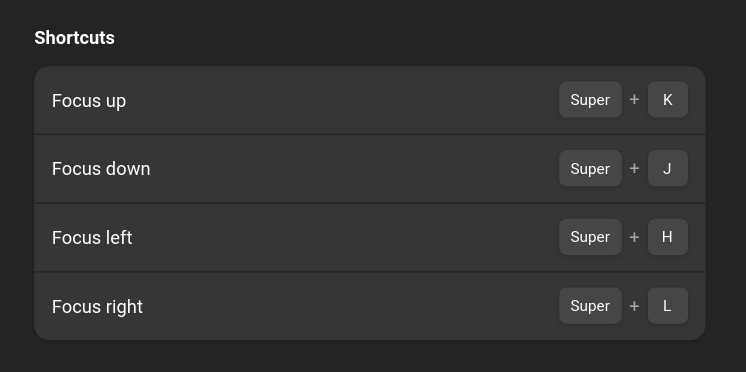
Change focus between windows in all directions. The extension will first try to find a suitable window within the same monitor. If there is none, it will try to find one on the next monitor in that direction (in a multi-monitor setup). Default shortcuts (can be changed in preferences): <Super>+h = Focus left <Super>+j = Focus down <Super>+k = Focus up <Super>+l = Focus right
Unfortunately, to help prevent spam, we require that you log in to GNOME Shell Extensions in order to post a comment or report an error. You understand, right?
| Version | Status | Shell Versions |
|---|---|---|
| 25 | Active |
45
46
47
48
49
50
|
| 24 | Active |
45
46
47
48
49
|
| 23 | Active |
45
46
47
48
|
| 22 | Active |
45
46
47
48
|
| 21 | Active |
45
46
47
|
| 20 | Active |
45
46
|
| 19 | Active |
45
46
|
| 18 | Active |
45
|
| 17 | Active |
45
|
| 16 | Active |
45
|
| 15 | Rejected |
45
|
| 14 | Active |
40
41
42
43
44
|
| 13 | Active |
40
41
42
43
|
| 12 | Active |
40
41
42
|
| 11 | Active |
40
41
42
|
| 10 | Rejected |
3.36
3.38
|
| 9 | Active |
3.36
3.38
|
| 8 | Active |
40
41
|
| 7 | Active |
40
41
|
| 6 | Active |
3.36
3.38
|
| 5 | Inactive |
3.36
3.38
|
| 4 | Inactive |
40
41
|
| 3 | Rejected |
40
41
|
| 2 | Inactive |
41
|
| 1 | Rejected |
41
|
User Reviews
Loading reviews…