

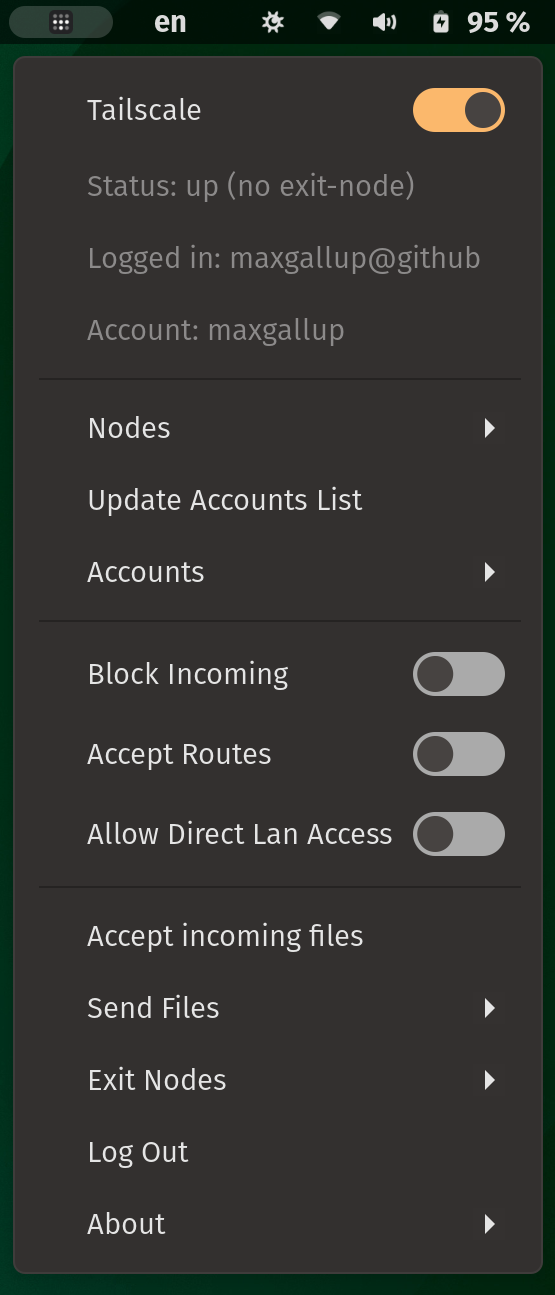
Manage Tailscale connections and check status from desktop read more at https://github.com/maxgallup/tailscale-status/blob/main/README.md
Note: Binary files aren't shown on the web site. To see all files, please download the extension zipfile.
| Version | Status |
|---|---|
| 41 | Active |
| 40 | Active |
| 39 | Active |
| 38 | Active |
| 37 | Active |
| 36 | Active |
| 35 | Active |
| 34 | Active |
| 33 | Active |
| 32 | Active |
| 31 | Active |
| 30 | Active |
| 29 | Active |
| 28 | Active |
| 27 | Active |
| 26 | Active |
| 25 | Active |
| 24 | Active |
| 23 | Active |
| 22 | Rejected |
| 21 | Rejected |
| 20 | Active |
| 19 | Rejected |
| 18 | Active |
| 17 | Active |
| 16 | Active |
| 15 | Active |
| 14 | Active |
| 13 | Active |
| 12 | Rejected |
| 11 | Active |
| 10 | Active |
| 9 | Active |
| 8 | Rejected |
| 7 | Rejected |
| 6 | Active |
| 5 | Active |
| 4 | Active |
| 3 | Rejected |
| 2 | Active |
| 1 | Active |
What is `filedialog.py` doing exactly? and can you do that in gjs? https://gjs.guide/extensions/review-guidelines/review-guidelines.html#scripts-and-binaries
filedialog.py only opens a dialog box to select a file. Unfortunately I wasn't able to find a way to do that in gjs. Ideally, there would be a way to open the default file manager, however I couldn't find a way to do that. Suggestions welcome!
 Tailscale Status