

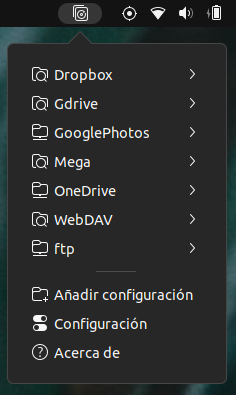
Is like Dropbox sync client but for more than 30 services, adds an indicator to the top panel so you can manage the rclone profiles configured in your system, perform operations such as mount as remote, watch for file modifications, sync with remote storage, navigate it's main folder. Also, it shows the status of each profile so you can supervise the operations, and provides an easy access log of events. Backup and restore the rclone configuration file, so you won't have to configure all your devices one by one
Note: Binary files aren't shown on the web site. To see all files, please download the extension zipfile.
| Version | Status |
|---|---|
| 20 | Active |
| 19 | Rejected |
| 18 | Active |
| 17 | Active |
| 16 | Active |
| 15 | Active |
| 14 | Inactive |
| 13 | Active |
| 12 | Rejected |
| 11 | Rejected |
| 10 | Active |
| 9 | Active |
| 8 | Active |
| 7 | Active |
| 6 | Rejected |
| 5 | Active |
| 4 | Active |
| 3 | Active |
| 2 | Rejected |
| 1 | Active |
1. Please remove line 500 `extension.js`. 2. What's the reason for using `timeout_source_new` instead of `timeout_add`? - [GLib.timeout_add()](https://gjs-docs.gnome.org/glib20~2.0/glib.timeout_add) - [GLib.timeout_add_seconds()](https://gjs-docs.gnome.org/glib20~2.0/glib.timeout_add_seconds)
1- removed 2-documentation of timeout_add does not provide a method for removing the timer. Also, returning false is not working for me
For timeout add, please look at the example here: https://gjs.guide/extensions/review-guidelines/review-guidelines.html#remove-main-loop-sources doesn't that work for you?
 rclone-manager