

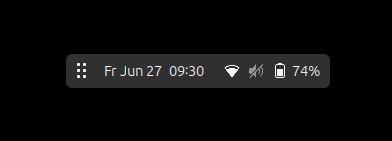
A movable and always-on-top Mini Panel with just DateMenu and QuickSettings. << Work maximized or fullscreen and stay informed about time and your system >> When enabled it hides the Main Panel and shows itself instead. Move the Mini Panel by dragging it with the handle button. Moving it over screen edges, will align it to the edges. Click the handle button to show AppGrid with the Main Panel. A right click will hide the Mini Panel for 5 sec, so you can reach obstructed window elements. With support for System-, Extension- and AppIndicators! Use middle-click on Handle Button to open/close the Drawer and on Extension Indicators to move them between Drawer and Always-Visible-Area. Aside from that there are Default Positions, Dynamic Border Edges, Vertical Orientation (experimental) and a Menu, which is reachable via a Right Button Longpress on the handle button. Attention: When installing for the first time or disable/enable accross sessions, you have to logout and login again, because this extension relies on the GNOME Shell 'startup-complete' signal to function correctly!
Note: Binary files aren't shown on the web site. To see all files, please download the extension zipfile.
 Floating Mini Panel