

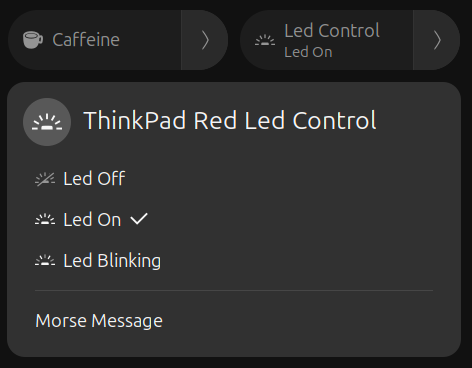
A GNOME Shell extension to control and customize the ThinkPad red LED directly from the top panel. It allows you to turn on/off the LED, blink it and send morse code messages. Note: Secure Boot / kernel lockdown can block LED control; disable Secure Boot or boot with lockdown=none. Setup helper: Quick setup (recommended): bash $HOME/.local/share/gnome-shell/extensions/thinkpad-red-led@juanmagd.dev/install.sh Manual setup: EXT_SRC="$HOME/.local/share/gnome-shell/extensions/thinkpad-red-led@juanmagd.dev/tools/thinkpad-red-led-helper" sudo install -o root -g root -m 0755 "$EXT_SRC" /usr/local/bin/thinkpad-red-led-helper sudo visudo -f /etc/sudoers.d/thinkpad-red-led Add line (replace with your username): your_user ALL=(root) NOPASSWD: /usr/local/bin/thinkpad-red-led-helper System-wide install: EXT_SRC="/usr/share/gnome-shell/extensions/thinkpad-red-led@juanmagd.dev/tools/thinkpad-red-led-helper" Then restart GNOME Shell or disable/enable the extension.
Note: Binary files aren't shown on the web site. To see all files, please download the extension zipfile.
1. Please use aysnc for reading file content since you are in shell process (line 176, 239 `extension.js`): [Gio.File.load_contents_async](https://gjs-docs.gnome.org/gio20~2.0/gio.file#method-load_contents_async) 2. Timeout should be removed on destroy and also before creating a new one (line 360 `extension.js`): [EGO Review Guidelines: Timeout](https://gjs.guide/extensions/review-guidelines/review-guidelines.html#remove-main-loop-sources) 3. Please follow our rules for clipboard: [EGO Review Guidelines: Clipboard](https://gjs.guide/extensions/review-guidelines/review-guidelines.html#clipboard-access-must-be-declared) 4. You cannot use `sudo` in extensions (line 206 `extension.js`). 5. Remove the `install.sh` and `tools` folder. Just mention in the description so users can download and use it from the repo.
6. Also remove the "Manual setup" instruction section from the description since you are putting lots of sudo scripts there.
 ThinkPad Red Led Control