


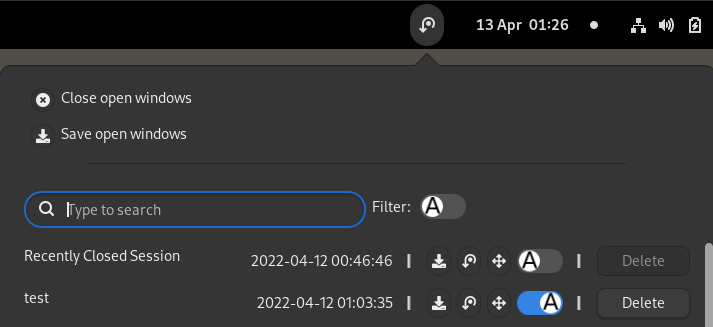
Close open windows gracefully and save them as a session. And you can restore them when necessary manually or automatically at startup. Most importantly, it supports both X11 and Wayland! Main features: - Restore the previous session at startup. disabled by default. - Save running apps and windows automatically when necessary, this will be used to restore the previous session at startup. - Close running apps and windows automatically before Log Out, Restart, Power Off. disabled by default. - Close running windows gracefully - Close apps with multiple windows gracefully via ydotool so you don't lose sessions of this app (See also: How to make Close by rules work) - Save running apps and windows manually - Restore a selected session at startup (See also: #9). disabled by default. - Restore a saved session manually - Restore window state, including Always on Top, Always on Visible Workspace and maximization - Restore window workspace, size and position - Restore 2 column window tiling - Stash all supported window states so that those states will be restored after gnome shell restarts via Alt+F2 -> r or killall -3 gnome-shell. - Move windows to their own workspace according to a saved session - Support multi-monitor - Remove saved session to trash - Search saved session by the session name fuzzily For more information, please visit https://github.com/nlpsuge/gnome-shell-extension-another-window-session-manager/blob/feature-close-save-session-while-logout/README.md. Please report issues on Github.
Unfortunately, to help prevent spam, we require that you log in to GNOME Shell Extensions in order to post a comment or report an error. You understand, right?
| Version | Status | Shell Versions |
|---|---|---|
| 51 | Active |
45
46
47
48
49
|
| 50 | Active |
45
46
47
48
|
| 49 | Active |
45
46
|
| 48 | Active |
45
46
|
| 47 | Active |
45
46
|
| 46 | Active |
45
|
| 45 | Rejected |
45
|
| 44 | Rejected |
45
|
| 43 | Rejected |
45
|
| 42 | Rejected |
45
|
| 41 | Active |
40
41
42
43
44
|
| 40 | Active |
40
41
42
43
44
|
| 39 | Active |
40
41
42
43
44
|
| 38 | Active |
40
41
42
43
44
|
| 37 | Active |
40
41
42
43
|
| 36 | Active |
40
41
42
43
|
| 35 | Active |
40
41
42
43
|
| 34 | Active |
40
41
42
43
|
| 33 | Inactive |
40
41
42
43
|
| 32 | Rejected |
40
41
42
43
|
| 31 | Active |
40
41
42
43
|
| 30 | Active |
40
41
42
43
|
| 29 | Active |
40
41
42
43
|
| 28 | Active |
40
41
42
43
|
| 27 | Active |
40
41
42
43
|
| 26 | Active |
40
41
42
|
| 25 | Active |
40
41
42
|
| 24 | Active |
40
41
42
|
| 23 | Active |
40
41
42
|
| 22 | Active |
40
41
42
|
| 21 | Active |
40
41
42
|
| 20 | Active |
40
41
42
|
| 19 | Active |
40
41
42
|
| 18 | Active |
40
41
42
|
| 17 | Rejected |
40
41
42
|
| 16 | Active |
40
41
42
|
| 15 | Active |
40
41
42
|
| 14 | Rejected |
40
41
42
|
| 13 | Active |
40
41
42
|
| 12 | Rejected |
40
41
42
|
| 11 | Active |
40
41
|
| 10 | Active |
40
41
|
| 9 | Active |
40
41
|
| 8 | Inactive |
40
41
|
| 7 | Active |
40
41
|
| 6 | Active |
40
41
|
| 5 | Rejected |
40
41
|
| 4 | Active |
40
41
|
| 3 | Rejected |
40
41
|
| 2 | Rejected |
40
41
|
| 1 | Active |
40
41
|
User Reviews
Loading reviews…