


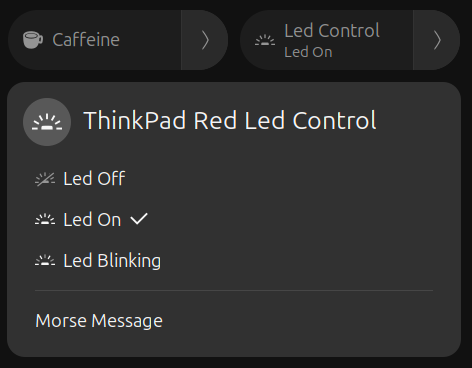
A GNOME Shell extension to control and customize the ThinkPad red LED directly from the top panel. It allows you to turn on/off the LED, blink it and send morse code messages. Note: Secure Boot / kernel lockdown can block LED control; disable Secure Boot or boot with lockdown=none. Setup helper: Quick setup (recommended): bash $HOME/.local/share/gnome-shell/extensions/thinkpad-red-led@juanmagd.dev/install.sh Manual setup: EXT_SRC="$HOME/.local/share/gnome-shell/extensions/thinkpad-red-led@juanmagd.dev/tools/thinkpad-red-led-helper" sudo install -o root -g root -m 0755 "$EXT_SRC" /usr/local/bin/thinkpad-red-led-helper sudo visudo -f /etc/sudoers.d/thinkpad-red-led Add line (replace with your username): your_user ALL=(root) NOPASSWD: /usr/local/bin/thinkpad-red-led-helper System-wide install: EXT_SRC="/usr/share/gnome-shell/extensions/thinkpad-red-led@juanmagd.dev/tools/thinkpad-red-led-helper" Then restart GNOME Shell or disable/enable the extension.
Unfortunately, to help prevent spam, we require that you log in to GNOME Shell Extensions in order to post a comment or report an error. You understand, right?
| Version | Status | Shell Versions |
|---|---|---|
| 7 | Rejected |
46
47
48
49
|
| 6 | Active |
46
47
48
49
|
| 5 | Active |
46
47
48
|
| 4 | Active |
46
47
|
| 3 | Active |
46
|
| 2 | Inactive |
46
|
| 1 | Rejected |
46
|
User Reviews
Loading reviews…