


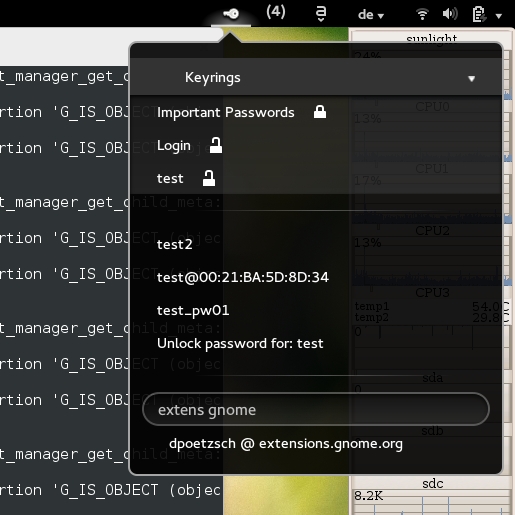
Access passwords from the gnome keyring in a convenient way: Simply search for your password and copy it to clipboad by clicking it. After a certain amount of time it will be removed automatically (default is 5 seconds). As this only works if the keyrings are unlocked, this extension also provides easy access to lock/unlock keyrings.
Unfortunately, to help prevent spam, we require that you log in to GNOME Shell Extensions in order to post a comment or report an error. You understand, right?
| Version | Status | Shell Versions |
|---|---|---|
| 24 | Active |
41
42
43
44
|
| 23 | Active |
41
42
43
|
| 22 | Active |
41
|
| 21 | Rejected |
41
|
| 20 | Active |
40
|
| 19 | Active |
40
|
| 18 | Active |
3.10
3.14
3.16
3.18
3.20
3.22
3.30
3.34
3.32
|
| 17 | Active |
3.10
3.14
3.16
3.18
3.20
3.22
3.30
3.32
|
| 16 | Rejected |
3.10
3.14
3.16
3.18
3.20
3.22
3.30
3.32
|
| 15 | Active |
3.10
3.14
3.16
3.18
3.20
3.22
3.30
3.32
|
| 14 | Active |
3.10
3.14
3.16
3.18
3.20
3.22
3.30
3.32
|
| 13 | Active |
3.10
3.14
3.16
3.18
3.20
3.22
|
| 12 | Active |
3.10
3.14
3.16
3.18
3.20
3.22
|
| 11 | Active |
3.10
3.14
3.16
3.18
3.20
3.22
|
| 10 | Rejected |
3.10
3.14
3.16
3.18
3.20
3.22
|
| 9 | Active |
3.10
3.14
3.16
3.18
3.20
3.22
|
| 8 | Active |
3.10
3.14
3.16
3.18
3.20
3.22
|
| 7 | Active |
3.10
3.14
3.16
3.18
3.20
|
| 6 | Active |
3.10
3.14
3.16
3.18
|
| 5 | Active |
3.10
3.14
3.16
|
| 4 | Active |
3.10
3.14
|
| 3 | Active |
3.10
|
| 2 | Rejected |
3.10
|
| 1 | Rejected |
3.10
|
User Reviews
Loading reviews…