

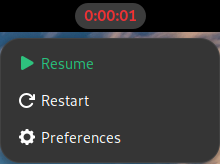
Track your working time from the top panel: one click to start or pause, a running counter, and alarms that keep the day on track. Features: - Tracking — start/pause from the panel menu, cumulative counter shown as H:MM or H:MM:SS, restart to a preset value at any time - Break alarm — a notification after a chosen span of uninterrupted tracking, with a Postpone dialog - Start tracking reminder — a notification when the tracker stays paused inside your working hours, with Start, Postpone and Not today actions - Tracked time goal — a notification when the counter reaches your target, postponed by further tracked time rather than by the clock - Appearance — separate colors for the running and paused states, optional seconds in the indicator - Lock/suspend handling — optionally pause while the screen is locked; when disabled, time spent locked or suspended is recovered on resume - Logging — append every state change to ~/timeTrack.log, optionally capped to a number of lines - The counter may go negative, so you can count time owed down against a daily target - Localisation — English and Russian
Note: Binary files aren't shown on the web site. To see all files, please download the extension zipfile.
| Version | Status |
|---|---|
| 18 | Active |
| 17 | Rejected |
| 16 | Rejected |
| 15 | Active |
| 14 | Rejected |
| 13 | Active |
| 12 | Rejected |
| 11 | Active |
| 10 | Active |
| 9 | Active |
| 8 | Active |
| 7 | Active |
| 6 | Active |
| 5 | Active |
| 4 | Active |
| 3 | Rejected |
| 2 | Rejected |
| 1 | Rejected |
 Chronos Time Tracker