

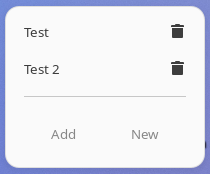
GNOME Shell Extension for Quick Access to Google Meet. With this extension, you can quickly access your Google Meet bookmarks directly from the Gnome Shell panel. You can add new bookmarks, manage existing ones, and directly open Meet sessions in your browser. Features: - 'New Meet': Opens a new Google Meet session in your default browser. - 'Add': Allows you to add a new bookmark to your Google Meet sessions. Simply provide a name and a unique code. To delete a bookmark, simply click on the trash icon next to each bookmark in the menu. This extension is not affiliated, funded, or in any way associated with Google and GMeet. For additional support, please contact the extension developer.
Note: Binary files aren't shown on the web site. To see all files, please download the extension zipfile.
EGO-X-004 warning
extensions should avoid synchronous file IO in shell code
Shell code should avoid synchronous file IO APIs like `GLib.file_get_contents()` and `Gio.File.load_contents()`.
extension.js:81
bookmarksFile.load_contents(null)
EGO-L-002 warning
objects created by extension should be destroyed in disable()
Objects assigned in `enable()` are missing matching `.destroy()` calls in `disable()` or its helper methods.
extension.js:152
        this._horizontalContainer = new St.BoxLayout({
            vertical: false,
            style_class: 'horizontal-container',
            x_expand: true
        })
extension.js:15
this._indicator = new PanelMenu.Button(0.0, 'Google Meet', false)
extension.js:141
this._separator = new PopupMenu.PopupSeparatorMenuItem()
EGO-L-005 warning
owned object references should be released in disable()
Owned references that are cleaned up in `disable()` should also be released with `null` or `undefined`.
extension.js:152
        this._horizontalContainer = new St.BoxLayout({
            vertical: false,
            style_class: 'horizontal-container',
            x_expand: true
        })
extension.js:15
this._indicator = new PanelMenu.Button(0.0, 'Google Meet', false)
extension.js:141
this._separator = new PopupMenu.PopupSeparatorMenuItem()
| Version | Status |
|---|---|
| 22 | Active |
| 21 | Active |
| 20 | Rejected |
| 19 | Active |
| 18 | Rejected |
| 17 | Active |
| 16 | Active |
| 15 | Active |
| 14 | Active |
| 13 | Active |
| 12 | Active |
| 11 | Rejected |
| 10 | Active |
| 9 | Rejected |
| 8 | Active |
| 7 | Rejected |
| 6 | Rejected |
| 5 | Active |
| 4 | Rejected |
| 3 | Rejected |
| 2 | Rejected |
| 1 | Rejected |
 GMeet
GMeet