

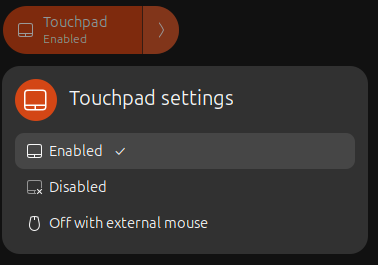
Touchpad Switcher allows you to easily toggle the touchpad on and off via the GNOME quick settings menu. It also includes an optional indicator to display the current touchpad state in the system tray. P.S. extension icon by icons8.com
Note: Binary files aren't shown on the web site. To see all files, please download the extension zipfile.
| Version | Status |
|---|---|
| 18 | Active |
| 17 | Active |
| 16 | Active |
| 15 | Rejected |
| 14 | Active |
| 13 | Rejected |
| 12 | Active |
| 11 | Active |
| 10 | Active |
| 9 | Active |
| 8 | Active |
| 7 | Active |
| 6 | Active |
| 5 | Active |
| 4 | Active |
| 3 | Rejected |
| 2 | Rejected |
| 1 | Active |
1. You cannot get extension's gsettings like that (line 35 `prefs.js`). 2. You cannot leave instance of objects in global scope after window close (line 35 `prefs.js`). Highly recommend to don't old packages (before GNOME Shell 45) since we don't have many distros using them and also hard to maintain. Also, don't send packages here without testing.
Thanks! Both issues are fixed: switched to ExtensionUtils.getSettings(); removed the global Gio.Settings instance from prefs.js. I did test the extension before uploading it, and it works as expected. Testing was performed in a virtual machine setup. This work was driven by a user request in: https://github.com/gpawru/touchpad/issues/13
Thanks! I hope they can move to the latest LTS or a more updated distros.
Thanks for the review! Yes, I hope so too.
 Touchpad Switcher