

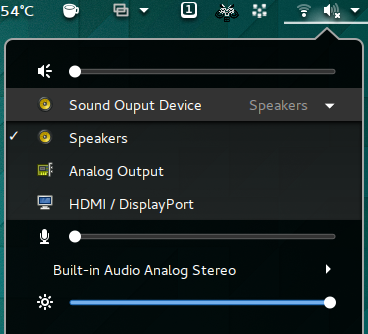
Shows a list of sound output and input devices (similar to gnome sound settings) in the status menu below the volume slider. Various active ports like HDMI , Speakers etc. of the same device are also displayed for selection. V20+ needs python as dependency. If you want to continue with the old method without Python, use options to switch off New Port identification. But it works with only English
Note: Binary files aren't shown on the web site. To see all files, please download the extension zipfile.
| Version | Status |
|---|---|
| 44 | Active |
| 43 | Active |
| 42 | Active |
| 41 | Active |
| 40 | Active |
| 39 | Rejected |
| 38 | Active |
| 37 | Inactive |
| 36 | Active |
| 35 | Active |
| 34 | Active |
| 33 | Inactive |
| 32 | Inactive |
| 31 | Inactive |
| 30 | Inactive |
| 29 | Inactive |
| 28 | Inactive |
| 27 | Rejected |
| 26 | Inactive |
| 25 | Inactive |
| 24 | Rejected |
| 23 | Inactive |
| 22 | Inactive |
| 21 | Inactive |
| 20 | Inactive |
| 19 | Inactive |
| 18 | Inactive |
| 17 | Active |
| 16 | Inactive |
| 15 | Inactive |
| 14 | Inactive |
| 13 | Inactive |
| 12 | Inactive |
| 11 | Inactive |
| 10 | Inactive |
| 9 | Inactive |
| 8 | Inactive |
| 7 | Rejected |
| 6 | Inactive |
| 5 | Inactive |
| 4 | Inactive |
| 3 | Active |
| 2 | Inactive |
| 1 | Inactive |
FYI PopupMenu.PopupMenuItem is usually a GObject, so I'm not sure how well your approach to subclassing will work.
 Sound Input & Output Device Chooser