

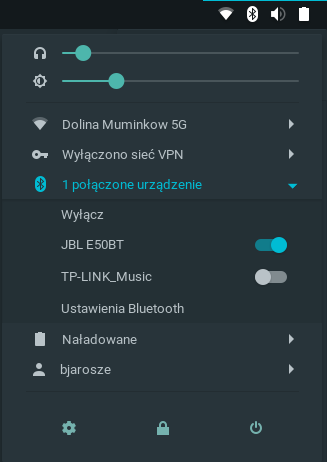
This extension allows paired Bluetooth devices to be connected and disconnected via the GNOME system menu, Shows battery status and more.
Note: Binary files aren't shown on the web site. To see all files, please download the extension zipfile.
| Version | Status |
|---|---|
| 55 | Active |
| 54 | Active |
| 53 | Active |
| 52 | Active |
| 51 | Active |
| 50 | Active |
| 49 | Active |
| 48 | Active |
| 47 | Rejected |
| 46 | Active |
| 45 | Rejected |
| 44 | Rejected |
| 43 | Active |
| 42 | Active |
| 41 | Active |
| 40 | Active |
| 39 | Active |
| 38 | Rejected |
| 37 | Active |
| 36 | Active |
| 35 | Rejected |
| 34 | Active |
| 33 | Active |
| 32 | Active |
| 31 | Active |
| 30 | Active |
| 29 | Active |
| 28 | Rejected |
| 27 | Active |
| 26 | Active |
| 25 | Active |
| 24 | Rejected |
| 23 | Active |
| 22 | Active |
| 21 | Rejected |
| 20 | Active |
| 19 | Active |
| 18 | Inactive |
| 17 | Inactive |
| 16 | Active |
| 15 | Inactive |
| 14 | Rejected |
| 13 | Active |
| 12 | Inactive |
| 11 | Inactive |
| 10 | Active |
| 9 | Rejected |
| 8 | Active |
| 7 | Active |
| 6 | Inactive |
| 5 | Active |
| 4 | Active |
| 3 | Active |
| 2 | Active |
| 1 | Rejected |
You cannot create objects in global scope (line 25 extension.js). What legacy means in your code? GNOME 3.x?
Legacy means previous gnome-bluetooth API. Some linux distributions (like Ubuntu 22.04) uses Gnome 42, but old gnome-bluetooth API. Others (like Fedora 36) also uses Gnome 42, but new gnome-bluetooth API. So I cannot check Gnome version. Instead of that I check if new methods are defined in GnomeBluetooth.Client(). Do you have suggestion how I could achieve that differently?
Is checking GnomeBluetooth.Client.prototype.get_devices === undefined ok? Object will not be created.
Yes that's ok because no object will be created. If you want to create objects: ```js function getBluetooth() { if (new GnomeBluetooth.Client().get_devices === undefined) { return Me.imports.bluetooth_legacy; } return Me.imports.bluetooth; } ``` Now you can do this in line 40: ```js this._controller = new getBluetooth().BluetoothController(); ```
 Bluetooth Quick Connect