


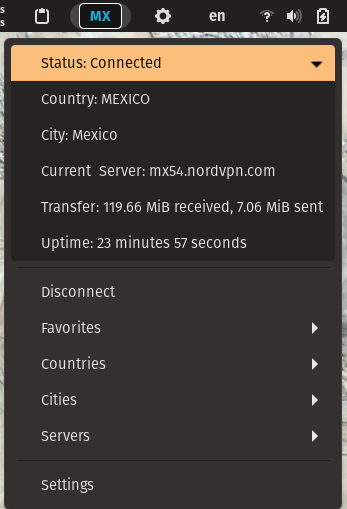
gNordVPN puts NordVPN controls directly in the GNOME top bar. It uses the NordVPN CLI under the hood to show live connection state, surface quick actions, and expose the most useful NordVPN settings without leaving the desktop shell. Features: 🖥️ Top-bar control: Connect, disconnect, and inspect NordVPN status from the GNOME panel. 📡 Live status display: See connection state, country, and server details at a glance. 🌍 Fast server selection: Browse and connect by country, city, or server. ⭐ Favorites: Pin commonly used countries, cities, and servers for quicker access. ⚙️ Connection preferences: Configure options such as auto-connect, protocol, and technology from the extension settings. 🧭 Panel customization: Move the indicator to the left, center, or right side of the top bar. 🎨 Style overrides: Complete customization using CSS for the different VPN states.
Unfortunately, to help prevent spam, we require that you log in to GNOME Shell Extensions in order to post a comment or report an error. You understand, right?
| Version | Status | Shell Versions |
|---|---|---|
| 33 | Active |
46
47
48
49
50
|
| 32 | Active |
46
47
48
49
|
| 31 | Active |
46
47
48
49
|
| 30 | Active |
46
47
48
|
| 29 | Active |
46
47
|
| 28 | Active |
46
|
| 27 | Active |
46
|
| 26 | Active |
45
|
| 25 | Active |
45
|
| 24 | Rejected |
45
|
| 23 | Active |
42
43
44
|
| 22 | Rejected |
42
43
44
|
| 21 | Active |
42
43
44
|
| 20 | Active |
43
44
|
| 19 | Rejected |
43
44
|
| 18 | Rejected |
43
44
|
| 17 | Rejected |
43
|
| 16 | Active |
43
|
| 15 | Active |
40
41
42
|
| 14 | Rejected |
40
41
42
|
| 13 | Active |
43
|
| 12 | Rejected |
40
41
42
43
|
| 11 | Active |
40
41
42
|
| 10 | Active |
3.38.1
40
41
42
3.38.4
|
| 9 | Active |
40
3.38.4
40.5
|
| 8 | Active |
3.38.1
3.38.4
|
| 7 | Rejected |
3.38.1
3.38.4
|
| 6 | Active |
3.38.1
|
| 5 | Active |
3.36.1
|
| 4 | Active |
3.34.1
3.34.3
|
| 3 | Rejected |
3.34.1
3.34.3
|
| 2 | Active |
3.34.1
3.34.3
|
| 1 | Active |
3.34.1
|
User Reviews
Loading reviews…