

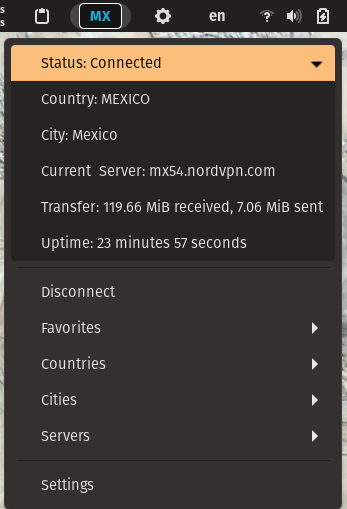
gNordVPN puts NordVPN controls directly in the GNOME top bar. It uses the NordVPN CLI under the hood to show live connection state, surface quick actions, and expose the most useful NordVPN settings without leaving the desktop. Features: 🖥️ Top-bar control: Connect, disconnect, and inspect NordVPN status from the GNOME panel. 📡 Live status display: See connection state, country, and server details at a glance. 🌍 Fast server selection: Browse and connect by country, city, or server. ⭐ Favorites: Pin commonly used countries, cities, and servers for quicker access. ⚙️ Connection preferences: Configure options such as auto-connect, protocol, and technology from the extension settings. 🧭 Panel customization: Move the indicator to the left, center, or right side of the top bar. 🎨 Style overrides: Complete customization of appearance using CSS for the different VPN states. Control colors, what's displayed, etc.
Note: Binary files aren't shown on the web site. To see all files, please download the extension zipfile.
| Version | Status |
|---|---|
| 33 | Active |
| 32 | Active |
| 31 | Active |
| 30 | Active |
| 29 | Active |
| 28 | Active |
| 27 | Active |
| 26 | Active |
| 25 | Active |
| 24 | Rejected |
| 23 | Active |
| 22 | Rejected |
| 21 | Active |
| 20 | Active |
| 19 | Rejected |
| 18 | Rejected |
| 17 | Rejected |
| 16 | Active |
| 15 | Active |
| 14 | Rejected |
| 13 | Active |
| 12 | Rejected |
| 11 | Active |
| 10 | Active |
| 9 | Active |
| 8 | Active |
| 7 | Rejected |
| 6 | Active |
| 5 | Active |
| 4 | Active |
| 3 | Rejected |
| 2 | Active |
| 1 | Active |
Ok but `Soup` has been loaded in GNOME Shell before and trying to change the version isn't doing anything (line 7 modules/Vpn.js).
That line has been in there for a while. The issue is that there were breaking changes between soup 2 and 3 and certain distros (Fedora off the top of my head) were using soup 3.x by default in gnome 42. This was breaking the extension in that distro. Forcing the version to 2.x fixed it. The version of this extension for gnome 43 does not have that compatibility force in it. I'm on element extensions channel right now if you want to talk in real time
That line has been in there for a while. The issue is that there were breaking changes between soup 2 and 3 and certain distros (Fedora off the top of my head) were using soup 3.x by default in gnome 42. This was breaking the extension in that distro. Forcing the version to 2.x fixed it. The version of this extension for gnome 43 does not have that compatibility force in it. I'm on element extensions channel right now if you want to talk in real time
Please remove that line and create a function that can check the soup version. Thanks!
 gNordVPN (nordvpn)