

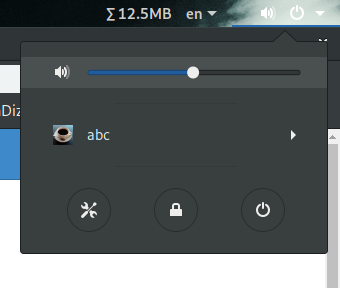
Control Alsa master volume from status menu. Requires 'amixer', provided by alsa-utils package.
Note: Binary files aren't shown on the web site. To see all files, please download the extension zipfile.
| Version | Status |
|---|---|
| 33 | Active |
| 32 | Rejected |
| 31 | Active |
| 30 | Rejected |
| 29 | Active |
| 28 | Active |
| 27 | Active |
| 26 | Rejected |
| 25 | Active |
| 24 | Active |
| 23 | Active |
| 22 | Rejected |
| 21 | Rejected |
| 20 | Active |
| 19 | Active |
| 18 | Active |
| 17 | Inactive |
| 16 | Rejected |
| 15 | Rejected |
| 14 | Inactive |
| 13 | Rejected |
| 12 | Rejected |
| 11 | Rejected |
| 10 | Inactive |
| 9 | Rejected |
| 8 | Rejected |
| 7 | Rejected |
| 6 | Rejected |
| 5 | Rejected |
| 4 | Rejected |
| 3 | Rejected |
| 2 | Rejected |
| 1 | Rejected |
No, that is not what I suggested - the default volume menu is already hidden as necessary (at least assuming the code is working as intended - if not, a bug report is more appropriate than a workaround in an extension), so you should not need to touch it at all. However if pulseaudio is running (e.g. the default volume indicator/menu is visible), *your* indicator and menu should hide themselves. Regarding "//expensive because of GLib.spawn_command_line_sync - only used on enable anyway" - if users use amixer themselves, the actual volume would get out of sync with what your menu claims, no? (Rejecting because of the first point - you may end up showing the default volume menu when it's not supposed to be visible)
I am using Arch and GNOME without pulseaudio installed. The indicator is hidden but the volume menu is not. It's been like this for some time. I didn't know this was a bug. I will stop modifying the mixer in the menu then. About the synchronization between amixer and the volume indicator, yes it would go out of sync. I don't know any way to "watch" for amixer value apart from sync/async polling it every 2 seconds. Is there any other way?
Oh right, looks like we only do that for the input slider - arguably that's still wrong, but I guess it's OK for you to show/hide the menu then. However you should still make sure to show/hide your indicator/menu as well!
 Alsa Mixer